

Swapping keys for fobs: access control for a small business
Seasonal staff, part-timers and a back door nobody can account for. Here is how fob and card access works for a small business, and what coastal weather asks of the hardware.
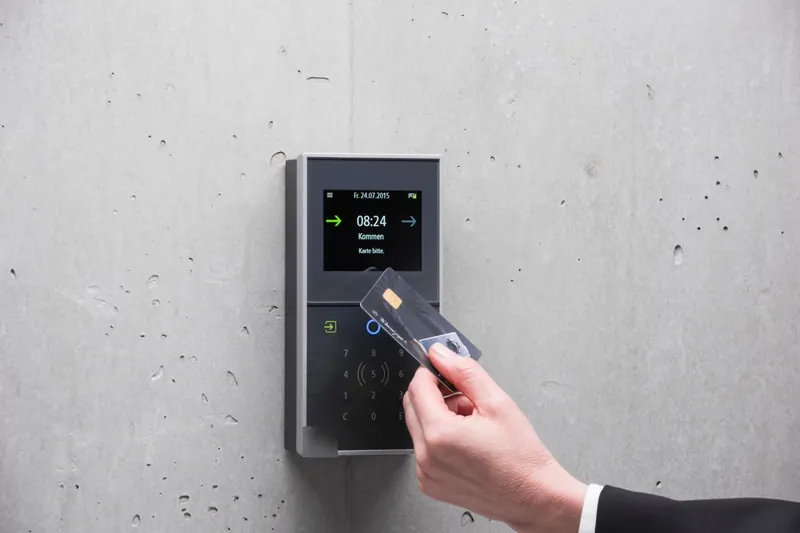
This guide covers the parts of a system, how it compares with rekeying, and what salt air, freeze-thaw and storm outages mean for hardware on an outside door in Halifax.
Why are small businesses moving from keys to fobs?
Because keys drift. A café on the peninsula takes on extra staff for the summer, a Dartmouth shop has students working evenings through the school year, a cleaner and a contractor each get a key for a week. A year later, nobody can say for certain how many copies of the back door key are out there.
A credential system changes that:
- Leavers are switched off, not chased. Delete the fob and it is dead, whether or not it comes back.
- A lost card costs you a minute. Cancel it and hand out a new one. No locks change.
- Every opening is logged. Useful when cash is short, stock goes missing or the alarm company calls about the back door at night.
- Doors follow the timetable. The entrance can unlock at opening and lock at close on its own, and a cleaner's fob can be limited to the evenings they work.
Rekey or go keyless when someone leaves?
Look at how often keys change hands and how many doors are involved.
| Your business | What tends to work |
|---|---|
| Two or three long-serving people, one or two doors | Keep keys. Rekey when one goes missing, and use restricted keys so copies can't be cut at a hardware counter |
| Seasonal hiring, shifts or a lot of part-time staff | Fobs or cards on the doors people use daily, so a departure is handled the same afternoon |
| Different people allowed in different rooms | Access control, or a master key system if you prefer mechanical keys |
| Cash office, pharmacy stock, server cupboard | Access control, for the record of who went in |
Plenty of owners mix the two: credentials on the busy doors and solid mechanical locks everywhere else. For the key side of that decision, see rekey vs replace locks.
Call or text and a person answers, 24 hours, 7 days. You approve the price before we start.
What are the parts of a system?
Every brand comes down to the same four pieces:
- Reader. Mounted outside the door. It takes a fob, a card, a code or a phone.
- Controller. The brain that checks whether this credential is allowed through this door right now.
- Locking hardware. Most often an electric strike in the frame, an electrified lever or exit device, and occasionally a magnetic lock.
- Software. Where you add people, set schedules and look up the log.
On a single door, all of that can live inside one standalone lock. On several doors, each one is wired to a central controller.
Should the software live in the cloud or in the building?
Either works well. The question is where you want to manage it from.
- In the building: the software sits on a panel or computer on site. It runs without an internet connection, and you manage it from there.
- In the cloud: you add and remove people from a browser or phone app, wherever you are. That suits an owner with a shop in Halifax and another in Bedford, or anyone who gets the "my fob won't work" text on a Sunday morning.
Whichever you choose, ask what still works when the internet drops, who is allowed to add users, and how long the log is kept.
How does salt air and storm weather affect door hardware?
An outside door in HRM deals with salt spray near the harbour, road salt tracked in through winter, fog and damp for days at a time, and freeze-thaw cycles that push water into anything with a gap. Hardware is rated by its maker for particular conditions, and those ratings differ from product to product. Check them for each part before it goes on an exterior door.
What makes the biggest difference on the coast:
- Corrosion-resistant finishes and sealed readers on any door that faces the weather or the water.
- A door that latches every time. Wind gusting against a door, or a closer that has gone sluggish, can leave it resting against the frame without latching. A door that isn't latched isn't locked, whatever the reader says.
- Strike and latch in line. Freeze-thaw and settling move frames a little each winter. A strike that sits slightly off makes the latch bind, and binding hardware fails early.
- Shelter for the reader where you can, such as a recess, canopy or vestibule, out of wind-driven rain.
What happens when the power goes out in a storm?
Nor'easters and the tail ends of tropical storms bring outages here, so plan each door's behaviour before you need it. As Allegion explains, fail-safe products unlock when power is removed, while fail-secure products stay locked (Allegion). An entrance that should stay secure overnight is usually fail-secure, with a key override so staff can still get in.
A backup battery bridges most short outages. For longer ones, know where the override keys are kept and who holds them, and make sure that information isn't stored only in the cloud software you can no longer reach.
Getting out comes first: egress and fire safety
Whatever the access system is doing, people inside must be able to leave. That rule outranks everything else on the job.
The same Allegion source notes that most electrified locks and exit devices still allow free exit from the inside whether powered or not, while magnetic locks do not provide free egress by themselves and need release devices to do so. Required exits, fire-rated doors and doors with panic hardware need particular care, and the right hardware depends on the building, its use and the codes that apply. Settle egress with your installer, and with the building owner if you lease, before anything is ordered.
Before the site visit: a short prep list
Having these answers ready makes the first visit worth the time:
- Doors. Which ones you want controlled, and what is on them now: lever, deadbolt, storefront lock or panic bar. Our guide to commercial door lock types will help you name them.
- People. Roughly how many staff, cleaners and contractors need in, and through which doors.
- Hours. When you open and close, any shifts, and who locks up.
- Lease. Whether you own or rent the unit. If you rent, check whether the lease needs the landlord's consent for door hardware changes, and have their contact handy.
- Power and network. Where the nearest outlet and network connection are to each door.
Landlords who also manage residential units will find the key log habits in change locks after tenant moves out work just as well for staff keys.
When you are ready to plan it, our card and fob access control page explains how we set a system up with you.
Quick recap
- Fobs and cards can be cancelled the day someone leaves; keys can't.
- Start with the main entrance and the one room that matters most.
- Choose coastal-rated, sealed hardware for doors that face the weather.
- Decide fail-safe or fail-secure per door, and keep a key override for storm outages.
- Every exit must open from the inside. Plan that before buying anything.
Questions people ask
- What is the simplest access control setup for one door?
- A standalone lock with the reader built in, such as a keypad or fob lock, managed at the door itself. It suits one door and a small team. Once you have several doors or frequent staff changes, a networked or cloud system saves you walking to each lock to add or remove people.
- Do I need new doors to add fob access?
- Usually not. Most installs keep the existing door and add an electric strike or an electrified lock, a reader outside and wiring back to a controller. The state of the door and frame, and whether power can reach that spot, decide which hardware fits.
- Will my doors lock or unlock when the power goes out in a storm?
- That is chosen door by door. Fail-safe hardware releases when it loses power and fail-secure hardware stays locked. A backup battery keeps most systems running through a short outage, and a mechanical key override covers a long one.
Ready to sort it? Call or text.
Open 24 hours, 7 days. Text a photo first if that is easier.
Card and fob access control · You approve the price before we start.
Keep reading
All guides Plan ahead
Commercial door locks explained: which type is on your door?
Lever locks, mortise locks, storefront deadlocks and panic bars. How to tell which one your business has, where each belongs, and what the coast does to them.
 Right now
What to do after a break-in: the first 24 hours
Coming home to a forced door is a shock. This is the order that works: safety, police, a record of the damage, your insurer, a door that locks tonight, and every key and code that left with the thief.
 Plan ahead
The best garage door for Halifax weather: salt air, wind and freeze-thaw
Salt air, coastal wind and a winter that freezes and thaws all season ask different things of a garage door. Here is what to look for, part by part.